 BEARCO SUITE
Conduit Wallet
A small buying wallet lives in this browser. Fund it with XRP, then buy any token once or on a schedule; the tokens stay in this wallet, or land in any wallet you name. Bearco's server only keeps the schedule and wakes this browser to sign each buy. It holds no keys and can't change an amount, a token or a destination.
Using it on your phone? Keep buys on time with the screen off
Android may hold Chrome's wake-ups while the screen is off, so scheduled buys run late or get missed. These settings let them through:
- Chrome battery: Unrestricted - Settings → Apps → Chrome → Battery → Unrestricted.
- Samsung: Settings → Battery → Background usage limits → take Chrome out of Sleeping and Deep sleeping apps, and turn off Put unused apps to sleep.
- Power saving off while an auto-buy is running.
- Notifications allowed for bearcosuite.com - tap the icon left of the address → Permissions → Notifications → Allow.
Then press Test now under Background signing: a "Bearco DCA · test" notification means it's ready.
On iPhone, background signing needs Bearco on your Home Screen: Share → Add to Home Screen, open Bearco from there, then turn on notifications.
1 · Passkey
Fingerprint, face or PIN — no email, no password. Same passkey as Combine; your wallet and auto-buys are kept under it.0% commission. Flat 0.0002 XRP anti-spam fee per trade. Pool fees go to LPs.
2 · Conduit wallet
Keys are made here, encrypted with your passphrase, and never leave this browser.No conduit wallet in this browser yet.
Choose a passphrase. It encrypts the wallet's secret on this device. If you forget it, only your written-down seed gets the wallet back.
Write this seed down and keep it offline. Anyone with it controls the conduit wallet. You will not see it again unless you unlock and ask.
Send
Liquidate wallet
Sells every token below back to XRP through its pool, right now, at market. Untick anything to keep. Real transactions - they can't be undone.
SuperSync → Xaman
Your Xaman wallet needs a trust line for every token before it can receive it. This finds the ones it's missing and sends them to Xaman as sign requests, up to 8 per request (one atomic batch). You approve each in Xaman; Bearco never sees that wallet's keys. Each new trust line holds 0.2 XRP in your Xaman wallet (back when you remove it).
Wallet details
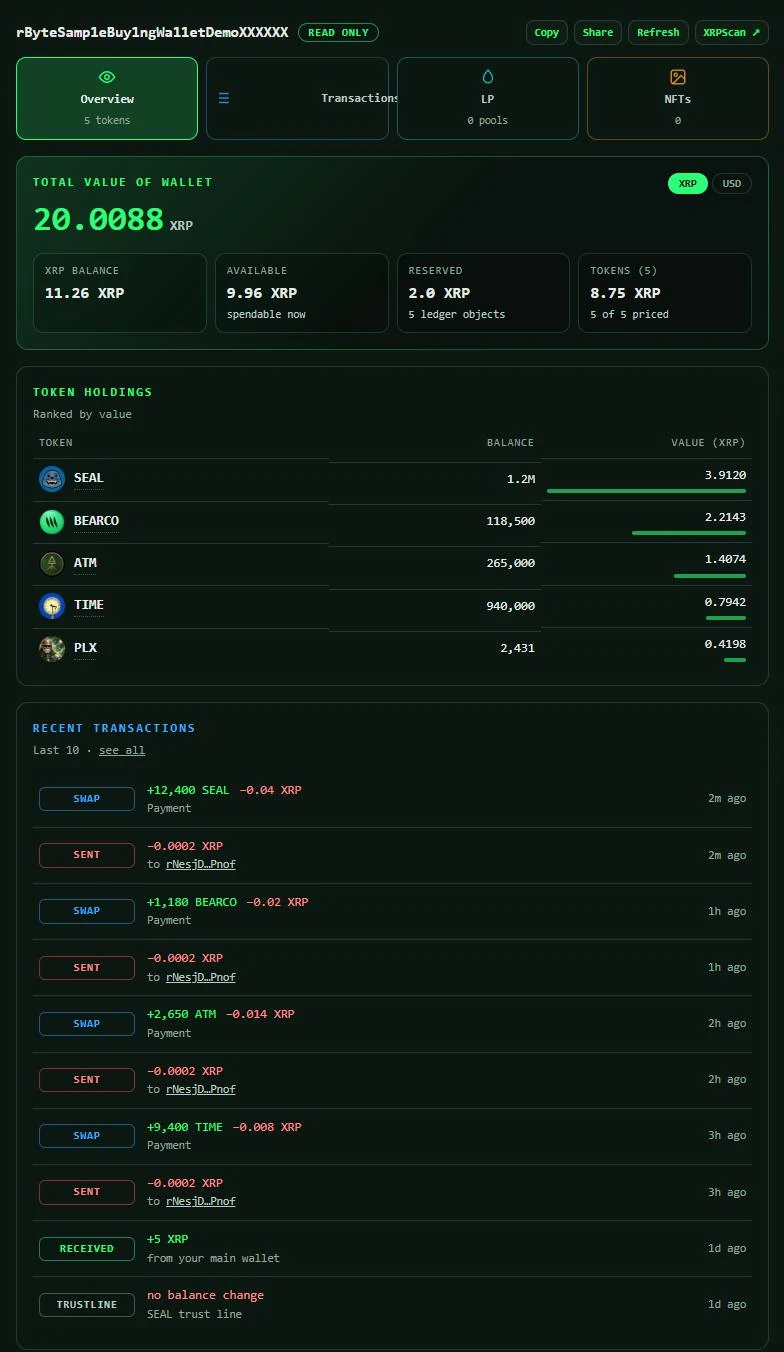
Everything the ledger knows about your buying wallet: tokens and total value, transactions, LP positions, NFTs. Open in ScopeYour DCA
What's DCA?
Dollar-cost averaging: instead of buying all at once, you split it into small buys on a schedule. Some land when the price is high, some when it's low, so you end up near the average price and don't have to time the market. Auto-buy does it for you: pick the total, how long, and how many buys. Auto-sell does the same in reverse, easing out of a token instead of dumping it at one price.
Start one from any token: press Buy (or Sell) and pick Auto-buy (DCA).
How it works. Each buy is one XRPL Payment signed by your buying wallet: spend up to the XRP you chose, route through the token's AMM pool, and refuse to fill below your price floor. Bearco's server keeps the schedule and, when a buy is due, wakes this browser with a notification so the wallet signs it here; the server never signs anything. A skipped buy keeps its slot for later. Pause or cancel any time.
What Bearco never has. Your seed, your passphrase, or the ability to move funds anywhere other than the destination you chose.
Reserve. The ledger keeps 1 XRP in the wallet while it exists and 0.2 XRP per token trust line (back when you remove the line). XRP held for a running auto-buy is yours and shows as "held", not as a fee. Fees: 0% commission, a flat 0.0002 XRP anti-spam fee per trade, and the pool's own fee, which goes to its liquidity providers.
What you'll see
A sample buying wallet: every token it holds and the wallet's total value, its transactions, LP positions and NFTs. Yours looks like this the moment it's funded.